5월, 2022의 게시물 표시

[Androidpublisher API] voidedpurchases 를 사용하여 인앱 결제 취소를 확인하여 인앱 사기를 방지하자!! - 2

이전 방식 처럼 한다면 매번 구글 계정으로 인증을 해야하는 문제가 있다. 콘솔이나 배치 시스템에서 인앱 결제 취소를 확인 하려면 뭔가 다른 방법으로 access_token을 획득 해야 한다. 토큰 요청시 grant_type을 refresh_token으로 하여 refresh_token으로 사용하면 구글 인증 없이 계속 갱신이 가능하다. 그러면 refresh_token은 어떻게 얻느냐? 구글 계정 인증시 최초 1회만 획득 할 수 있다. 그 이후에 인증을 하면 refresh_token 없이 access_token만 리턴 된다.  https://myaccount.google.com/u/0/permissions 구글에서 인증 계정으로 로그인 하고 위 링크로 접속하여 해당 서비스의 액세스 권한을 삭제하고  다시  https://accounts.google.com/o/oauth2/v2/auth 로 oauth 인증을 해보자 그러면 refresh_token을 반환할 것이다. 이후로 아래처럼 요청하면 인증 코드 없이 access_token을 갱신 할 수 있다. https://accounts.google.com/o/oauth2/token method=get parameter client_id=[입력] client_secret=[입력] grant_type=refresh_token refresh_token=[위에서 받은거 입력] ex) https://accounts.google.com/o/oauth2/token?client_id=[입력]&client_secret=[입력]& grant_type=refresh_token& refresh_token=[입력]
[Androidpublisher API] voidedpurchases 를 사용하여 인앱 결제 취소를 확인하여 인앱 사기를 방지하자!!

이미지
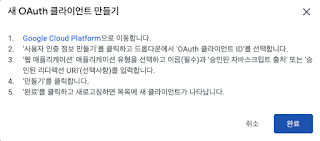
Google Play Console 접속 API 액세스 클릭 OAuth 클라이언트 단락에서 새 OAuth 클라이언트 만들기 클릭   위 팝업이 뜨면 Google Cloud Platform 파란색 링크 클릭하여 팝업 안내처럼 사용자 인증 정보를 만들고 완료 클릭 유형을 웹 어플리케이션 으로 할것 oauth 인증시 redirect_url이 필수 이므로 승인된 리디렉션 URI 항목을 추가한다.(로컬에서 테스트 하려면 https://localhost:8080이라도 넣는다.) 생성된 사용자 인증 정보를 보면 클라이언트 ID와 클라이언트 보안 비밀 이 있는데 다음 단계에서 필요하므로 기억하고 있자. 아래 URL을 통해 개발자 계정 소유자 계정으로 로그인하여 code를 받아야함. https: //accounts.google.com/o/oauth2/v2/auth METHOD = GET PARAMETERS scope =https :// www . googleapis . com / auth / androidpublisher access_type =offline redirect_uri =https :// localhost : 8080 // 인증후 이동할 페이지 client_id = // 클라이언트 아이디 GCP에서 확인 ~-~.apps.googleusercontent.com 형식 response_type =code ex ) https: //accounts.google.com/o/oauth2/v2/auth?scope=https://www.googleapis.com/auth/androidpublisher&access_type=offline&redirect_uri=[입력]&response_type=code&client_id=[입력]     구글 계정으로 로그인 하면 redirect_url로 이동하면서 아래와 같은 형식의 Url로 접속할 것임 https: //localhost:8080/...