[Androidpublisher API] voidedpurchases 를 사용하여 인앱 결제 취소를 확인하여 인앱 사기를 방지하자!!
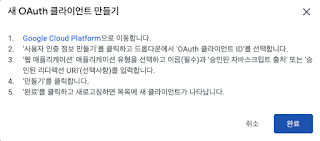
Google Play Console 접속 API 액세스 클릭 OAuth 클라이언트 단락에서 새 OAuth 클라이언트 만들기 클릭 위 팝업이 뜨면 Google Cloud Platform 파란색 링크 클릭하여 팝업 안내처럼 사용자 인증 정보를 만들고 완료 클릭 유형을 웹 어플리케이션 으로 할것 oauth 인증시 redirect_url이 필수 이므로 승인된 리디렉션 URI 항목을 추가한다.(로컬에서 테스트 하려면 https://localhost:8080이라도 넣는다.) 생성된 사용자 인증 정보를 보면 클라이언트 ID와 클라이언트 보안 비밀 이 있는데 다음 단계에서 필요하므로 기억하고 있자. 아래 URL을 통해 개발자 계정 소유자 계정으로 로그인하여 code를 받아야함. https: //accounts.google.com/o/oauth2/v2/auth METHOD = GET PARAMETERS scope =https :// www . googleapis . com / auth / androidpublisher access_type =offline redirect_uri =https :// localhost : 8080 // 인증후 이동할 페이지 client_id = // 클라이언트 아이디 GCP에서 확인 ~-~.apps.googleusercontent.com 형식 response_type =code ex ) https: //accounts.google.com/o/oauth2/v2/auth?scope=https://www.googleapis.com/auth/androidpublisher&access_type=offline&redirect_uri=[입력]&response_type=code&client_id=[입력] 구글 계정으로 로그인 하면 redirect_url로 이동하면서 아래와 같은 형식의 Url로 접속할 것임 https: //localhost:8080/...